
 Facebook
 X
X LinkedIn
 Forward
Center for Neural Systems Restoration - 2026 Fall Symposium
The second annual NeuroSystems symposium will bring together world-renowned scientists to spotlight recent advances in our understanding of neural circuits, brain states and pioneering neurotechnologies, including brain-computer interfaces, while showcasing the current field and charting future research directions. The event’s key focus is the translation of these advances into treatments for neurological disorders, with the goal of advancing the restoration of human neural function and impacting the future of clinical neuroscience.
Target Audience
All students, fellows, residents, researchers and clinicians interested in neuroprosthetics and neural restoration.

Course summary
| 15-Sep | ||||
| Time | Agenda Item / Session | Speaker | Affiliation | Presentation Title |
| 8:00 AM–3:00 PM | Registration | |||
| 8:00 AM | Breakfast | |||
| 9:00 AM | Opening Remarks | Valentin Dragoi, Ph.D. | HMRI/ Rice Univ./Weill Cornell | |
| 9:05 AM | Opening Remarks | Gavin Britz, M.D. | Houston Methodist/Weill Cornell | |
| 9:10 AM | Opening Remarks | Behnaam Aazhang, Ph.D. | Rice Univ. | |
| 9:15 AM | Session 1: Translational Neuroscience 1 | Nicole Provenza, Ph.D. | Baylor College of Medicine | Neural dynamics of psychiatric symptoms across timescales |
| 9:45 AM | Session 1: Translational Neuroscience 1 | Jeffrey Ojemann, M.D. | Univ. of Washington, Seattle | Engineering neuroplasticity: a 50-year bench-to-bedside journey |
| 10:15 AM | Session 1: Translational Neuroscience 1 | Nitin Tandon, M.D. | UTHealth, Houston | TBD |
| 10:45 AM | Coffee Break | |||
| 11:05 AM | Session 2: Neural Circuits 1 | Valentin Dragoi, Ph.D. | HMRI/ Rice Univ./Weill Cornell Medicine | Neural circuit mechanisms for natural behavior |
| 11:35 AM | Session 2: Neural Circuits 1 | Attila Losonczy, M.D., Ph.D. | UT Southwestern | Dendrites Decoded: Subcellular Representations of the Past and the Future in Hippocampal Pyramidal Neurons |
| 12:05 PM | Session 2: Neural Circuits 1 | Jonathan Victor, M.D., Ph.D. | Weill Cornell | How does human vision analyze elements of form? |
| 12:35 PM | Lunch Break/Tour of CNSR (sign-up sheet at registration desk) | |||
| 2:00 PM | Session 3: Innovative Neurotechnologies 1 | David W. Blodgett, JHU APL | Johns Hopkins Univ. | Towards an Operational Non-Invasive Brain-Computer Interface using Coherent Optical Sensing Techniques |
| 2:30 PM | Session 3: Innovative Neurotechnologies 1 | Christof Karmonik, Ph.D. | Houston Methodist | Pushing the Boundaries of Neuroimaging: Selected Applications of 7 Tesla MRI |
| 3:00 PM | Session 3: Innovative Neurotechnologies 1 | Damiano Barone, M.D., Ph.D. | Houston Methodist/Rice Univ. | The Spinal Cord as a Bidirectional Neural Interface: Toward High-Resolution Neurorestoration with Circumferential Intradural Arrays |
| 3:30 PM | Coffee Break | |||
| 3:50 PM | Session 4: Neural Circuits 2 | David Fitzpatrick, Ph.D. | Max Planck Florida Inst. for Neuroscience | Visualizing experience-driven functional reorganization of developing cortical circuits |
| 4:20 PM | Session 4: Neural Circuits 2 | Sabine Kastner, M.D., Ph.D. | Princeton Univ. | Neural dynamics of the primate attention network |
| 4:50 PM | Session 4: Neural Circuits 2 | Stefano Panzeri, Ph.D. | Univ. Medical Center Hamburg-Eppendorf | How functional, anatomical and effective interactions between neurons in posterior parietal cortex shape decision making |
| 5:20 PM | Hors d’oeuvres | |||
| 16-Sep | ||||
| Time | Agenda Item / Session | Speaker | Affiliation | Presentation Title |
| 8:00 AM–12:00 PM | Registration | |||
| 8:00 AM | Breakfast | |||
| 9:15 AM | Session 5: Translational Neuroscience 2 | Huda Y. Zoghbi, M.D. | Baylor College of Medicine | Molecular and Neurobiological Studies in Rett syndrome |
| 9:45 AM | Session 5: Translational Neuroscience 2 | Emery Brown, M.D., Ph.D. | MIT | Deciphering the Dynamics of the Unconscious Brain under General Anesthesia |
| 10:15 AM | Session 5: Translational Neuroscience 2 | Maryam Shanechi, Ph.D. | Univ. of Southern California | AI-Driven Neurotechnology: From Neural–Behavioral Dynamics to Brain Foundation Models |
| 10:45 AM | Coffee Break | |||
| 11:05 AM | Session 6: Neural Circuits 3 | Karel Svoboda, Ph.D. | Allen Inst. | Illuminating synaptic learning |
| 11:35 AM | Session 6: Neural Circuits 3 | Ralf Haefner, Ph.D. | Univ. of Rochester | Evidence for generative inference in the brain |
| 12:05 PM | Session 6: Neural Circuits 3 | Anirvan Nandy, Ph.D. | Yale Univ. | Behavioral and neural dynamics of cooperation in marmoset dyads |
| 12:35 PM | Lunch Break | |||
| 2:00 PM | Session 7: Innovative Neurotechnologies 2 | Christina Tringides, Ph.D. | Rice Univ. | Hydrogel-based neurotechnologies for seamless biological interfaces |
| 2:30 PM | Session 7: Innovative Neurotechnologies 2 | Jacob Robinson, Ph.D. | Rice Univ. / Motif Neurotech | Brain Computer Interfaces for Mental Health |
| 3:00 PM | Session 7: Innovative Neurotechnologies 2 | Rob Franklin, Ph.D. | Blackrock Neurotech | Empowered by Thought |
| 3:30 PM | Coffee Break | |||
| 3:50 PM | Session 8: Neural Circuits 4 | Ariana Andrei, Ph.D. | HMRI/ Rice Univ. | Causal activation of cortical networks to improve visual detection |
| 4:20 PM | Session 8: Neural Circuits 4 | Alex McDonald, Ph.D. Francois St-Pierre, Ph.D. | Baylor College of Medicine / Rice Univ. | From voltage imaging to optical control: building an integrated toolkit for neural circuit studies |
| 4:50 PM | Concluding Remarks | Valentin Dragoi, Ph.D. | HMRI/ Rice Univ./Weill Cornell | |
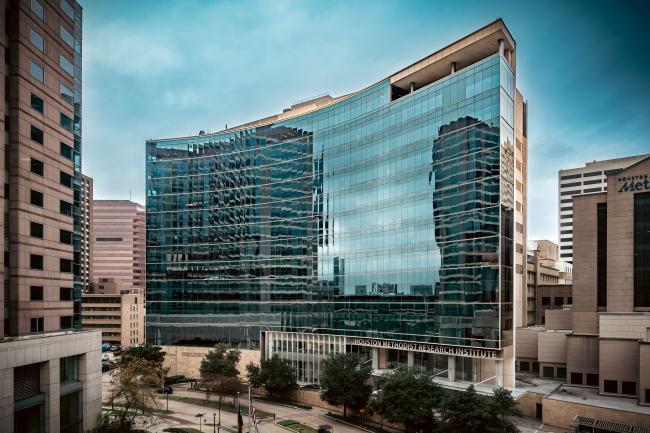
John F. Bookout Auditorium R2-306 is located on the second floor of the Houston Methodist Reasearch Institute Building.

REGISTRATION INSTRUCTIONS
- STEP 1 - Click the "Register" button.
- STEP 2 - Then click the "Take Course" button to continue with registration
For Houston Methodist Staff, Students, Physicians, etc.:
- If you’ve previously created a profile, proceed to register for your activity using the information you used to set up your account/profile.
- If you’re an employee of Houston Methodist accessing this site for the first time, click the “Houston Methodist” login button. Use your HM login information to get started. Once logged in, complete the following steps:
- Set up an account by creating a username and password.
- Update your profile.
- Provide and confirm your mobile number.
- Proceed to register for your activity.
For External Attendees:
- If you’ve previously created a profile, click the “Visitor Login” button to register for your activity.
- If you haven’t created an account yet, click the “Create New Visitor Account” button.
- Set up an account by creating a username and password.
- Update your profile.
- Provide and confirm your mobile number.
- Proceed to register for your activity.